
What You Will Need
- 01 2 or more Eyes of Ender in case one breaks or you want to refine the result.
- 02 Minecraft Java Edition so you can read your facing angle from the F3 screen.
- 03 The End Portal Calculator open and ready for your X, Z, and angle measurements.
Take Your First Measurement
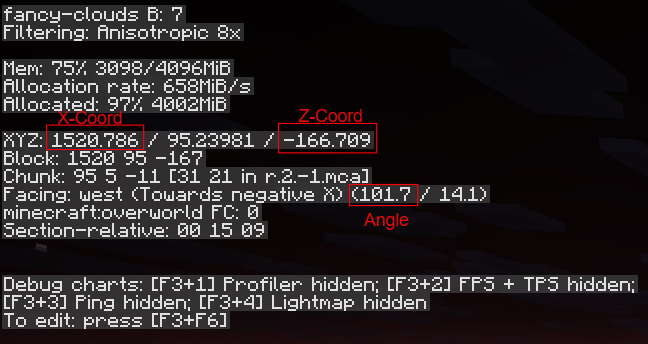
Stand in an open area, throw an Eye of Ender, and do not move from the block where you threw it. Wait until the Eye reaches the top of its arc and slows down. Record your current X and Z coordinates from the F3 screen.
You do not need the Y coordinate. The calculator only uses X, Z, and facing angle.
Find Your Facing Angle
Open the F3 debug screen and find the Facing line. Use the decimal angle shown in parentheses, not only the north, south, east, or west direction.
Keep every decimal Minecraft gives you. Rounding the angle early can move the final estimate by dozens of blocks.
Center Your Crosshair on the Eye
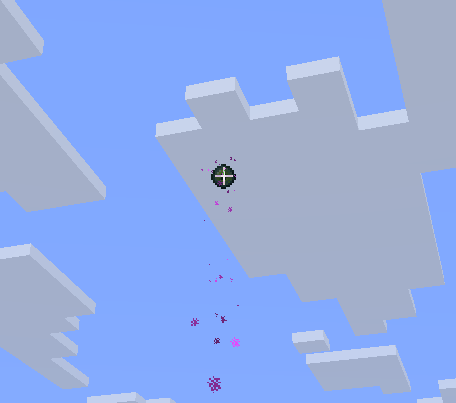
While standing completely still, aim at the center of the Eye itself. Do not aim at its particle trail.
Read the facing angle only after your crosshair is centered as precisely as possible.
Tiny aiming errors matter. A fraction of a degree can shift the intersection a long way, especially when both throws point in nearly the same direction.
Move Sideways for Your Second Throw
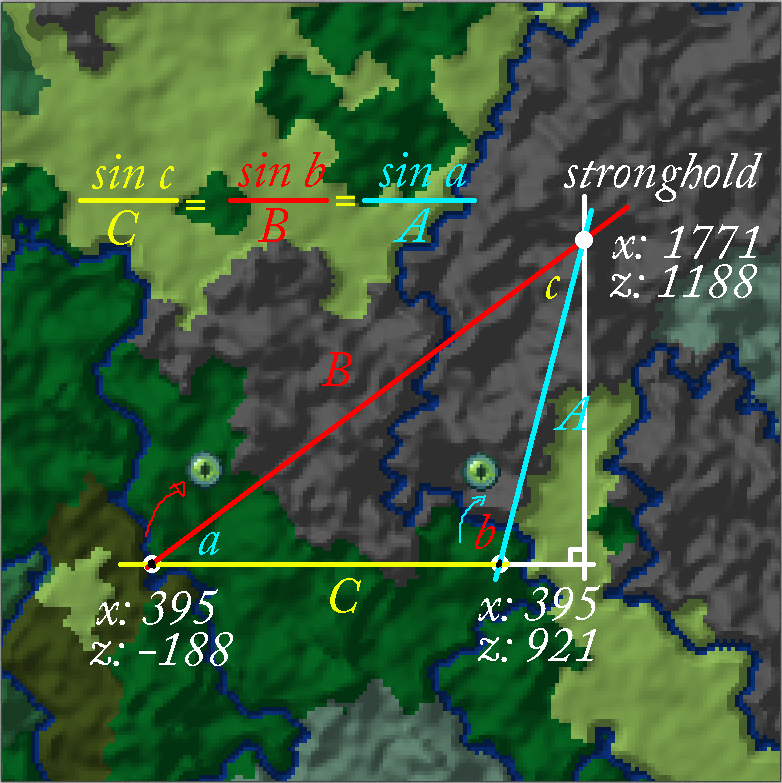
Do not simply follow the Eye straight toward the stronghold. Move sideways relative to the direction it traveled, then throw again from a clearly different position.
This creates two lines that cross at a stronger angle and produces a more stable estimate.
Aim for at least 10 degrees of separation between the two facing angles. The calculator rejects throws under roughly 5 degrees because nearly parallel lines magnify small measurement errors.
Take Your Second Measurement
Repeat the same process from your new position. Throw the Eye, stand still, center the crosshair on it, and record the new X coordinate, Z coordinate, and full decimal facing angle.
Before calculating, compare both angles. If the difference is small, move farther sideways and take a better second measurement instead of forcing an unstable result.
Estimate the Stronghold Location
Enter the first measurement under Throw 1 and the second under Throw 2. Select Calculate Stronghold, then travel toward the estimated X and Z coordinates.
Use Another Throw to Refine the Result
After a successful calculation, the calculator moves Throw 2 into the Throw 1 fields for you. This creates a quick rolling workflow for refining the estimate.
- 1 Travel toward the estimated coordinates.
- 2 Take a new Eye measurement from a useful sideways position.
- 3 Enter it as the new Throw 2 and calculate again.
- 4 Repeat if you want a tighter estimate before digging.
Before You Calculate...
- Stand completely still while taking each measurement.
- Wait for the Eye to slow near the top of its arc.
- Center the crosshair on the Eye, not its particles.
- Use the full decimal facing angle shown in F3.
- Prefer 10° or more of separation between throws.
- Use another throw to refine a broad first estimate.
